
How to calculate technician efficiency (the honest way)
Technician efficiency is the most mis-measured metric in auto workshops. Here's how to calculate it without fooling yourself.
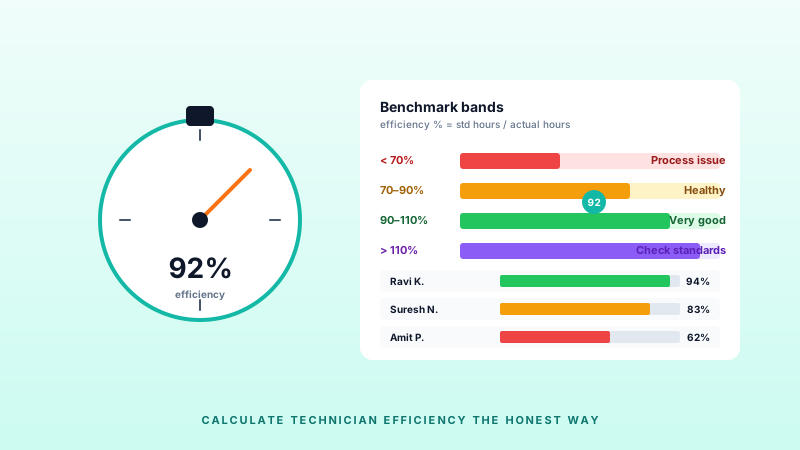
Most workshops either don't measure technician efficiency or measure it in a way that doesn't mean much. Here is the honest version.
The formula that matters
Efficiency % = (Standard hours billed / Actual hours worked) × 100
- Standard hours billed = the labour hours on every job card the technician completed, as published in the manufacturer or labour catalogue.
- Actual hours worked = the actual time the technician clocked on the shop floor (start to end, minus breaks).
A technician who finished 9 standard hours of work in an 8-hour shift is 112% efficient. A technician who finished 6 standard hours in an 8-hour shift is 75% efficient. That's it.
What counts as "actual hours"
- In: tool time, waiting for parts, internal QC rework, training.
- Out: breaks, personal time, non-workshop tasks.
If you count only tool-time, you'll get misleadingly high numbers. If you count every minute they're on premises, you'll get misleadingly low ones. Pick a definition and stick to it.
Benchmark ranges
- < 70%: there's a process problem (parts, dispatch, supervision)
- 70–90%: typical healthy workshop
- 90–110%: very good
- > 110%: suspicious — double-check your labour standards aren't outdated
Don't misuse it
- Don't use it as a headline KPI for customer-facing team members (advisors, service managers). Their job is not to be "efficient" in this sense.
- Don't reward high efficiency with bonus without also measuring QC pass rates. A fast technician who does rework 20% of the time isn't efficient — they're expensive.
- Don't compare specialists to generalists on the same scale.
Automate it
Measuring this manually is a disaster. A modern GMS should calculate and chart it automatically, per technician per day. Our own WMS does exactly this — see how.
Related reading
How to choose the best garage management software in India (2026 guide)
A practical buyers' guide for Indian auto workshops and garage chains — from single-bay independents to multi-city franchises.
AI in automotive workshops: hype vs. reality in 2026
Everyone claims AI. This post cuts through the noise — what AI actually does inside a working garage today, and what is still marketing.