
Digital job cards: 10 best practices that actually move the needle
What separates a job card that gets used from one that becomes shelf-ware. Ten patterns we see work, and three we see fail.
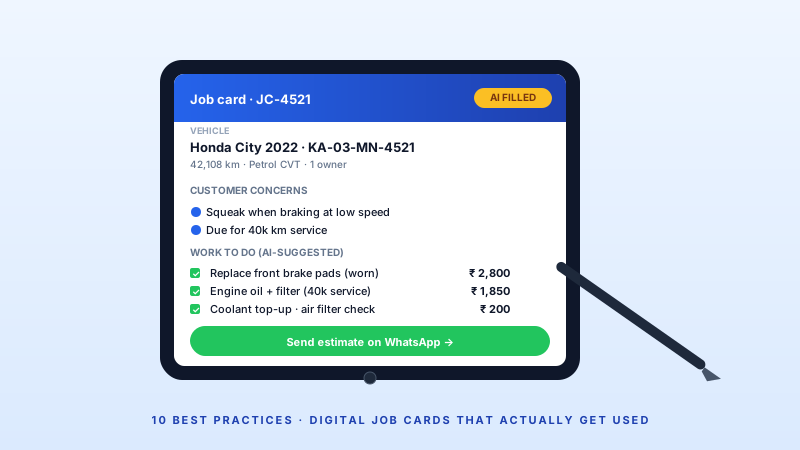
The job card is the single most important document in a workshop. Get it right, and every other process — parts, labour, billing, customer comms, warranty — works. Get it wrong, and everything downstream breaks.
Here are the 10 practices we see separate workshops that successfully go digital from those that quietly go back to paper after 3 months.
1. Capture vehicle condition before the customer leaves
Walk-around photos and a signed condition checklist at check-in are non-negotiable. Every workshop that skipped this lost at least one dispute ("that scratch was there before!") in the first 60 days.
2. Pre-fill from vehicle history
If the vehicle has been serviced before, the job card should auto-populate last kilometre reading, last services performed, open warnings, and recommended next-service items. Pre-fill reduces creation time by 60%+.
3. Capture customer complaints verbatim
Not "brake issue" — the customer said "when I brake at 60 km/h, the steering wheel shakes". That detail is what helps the technician diagnose. Voice-to-text helps here.
4. Split sections: customer concerns vs technician recommendations
Keep them separate. A customer walks in with 2 concerns; the technician finds 4 additional items. Don't merge — it causes disputes and missed work.
5. Use checklists, not free text
For common services — general, paid-service, pre-PUC, pre-insurance — use structured checklists. Free text is for unusual cases only.
6. Photos at every major milestone
Check-in, mid-job, ready-for-QC, delivery. 4 photos per job is about right. More is noise.
7. Estimates are a child of the job card, not a separate document
Estimate line items flow to the invoice one-to-one. No re-typing. No "which estimate was approved?" confusion.
8. Share the job card with the customer
A live link — read-only — that the customer can click any time. See the spare-parts added, see the labour, see the status. Reduces status-check calls by 70%.
9. E-signature at approval and delivery
Customer approves the estimate via a tap. Customer confirms delivery via a tap. Both get timestamped into the job card. Dispute-proof.
10. Link job cards to warranty and insurance events
If the job is warranty or insurance, tag it at creation. Downstream reporting becomes instant.
What NOT to do
- Don't allow job-card editing post-delivery (create amendments instead).
- Don't skip the "internal notes" field — technicians need a place for observations that don't belong on the invoice.
- Don't try to print everything — most digital job cards should never be printed.
All 10 of these are built into GetAFix WMS's digital job card. See it live in a 20-minute demo.
Related reading
How to choose the best garage management software in India (2026 guide)
A practical buyers' guide for Indian auto workshops and garage chains — from single-bay independents to multi-city franchises.
AI in automotive workshops: hype vs. reality in 2026
Everyone claims AI. This post cuts through the noise — what AI actually does inside a working garage today, and what is still marketing.